Aceessay.ai

The best essay ai humanizer tool

Last checked: October 2025. The latest Turnitin and GPTZero updates were used to compare the two tools.


✍️ Introduction: The Dilemma of Writing with AI

For many students, writing with AI has become part and parcel of everyday academic life, from polishing essays to paraphrasing complex ideas. Essay Done and AceEssay promise to make writing “smarter.” However, as AI detectors improve and universities strengthen their rules on academic integrity, the question is not just “Which tool writes better?” but also “Which tool keeps me safe?” Thus, this review pits AceEssay against Essay Done to see which AI humanizer truly balances AI reduction, academic tone, and ethical safety.


🎓 Why Do Students Turn to AI Humanizers

Most students do not use AI to “cheat.” They do it to clarify ideas, polish grammar, and avoid unintentional AI flags. For non-native English speakers, AI tools help make a rough draft into fluent academic writing. The difficulty lies in how “human” the text is in the end and whether the text passes the AI detectors without compromising logical flow or citation style.


🧩 Meet the Tools: AceEssay and Essay Done

🔹 What Is AceEssay?

AceEssay is an AI-powered academic editor and humanizer designed specifically for university students. Unlike generic rewriters, AceEssay integrates AI detection bypass, tone preservation, and citation protection within one platform.

Key features include:

  • AI humanization engine tested against Turnitin, GPTZero, and ZeroGPT
  • Ethical editing reminders and integrity policy
  • Support for academic formats (APA, MLA, Chicago)
  • Free preview and token-based pricing for budget-friendly use


🔹 What Is Essay Done?

Essay Done positions itself as a one-click AI rewriter that promises to make your essays sound “human.” Its appeal lies in its simplicity — paste your text, click “rewrite,” and get a new version in seconds.

However, as this review shows, speed comes at a cost: the rephrased results often sacrifice academic tone and citation accuracy, which can be risky under strict plagiarism policies.

⚙️ Test Setup (October 2025)

Both tools were used on the same 800-word academic essay, “The Role of Behavioral Economics in Public Policy.” The following metrics were considered:

MetricTool TestedCriteria
AI DetectionTurnitin + GPTZero% of text flagged as AI-generated
Grammar & ReadabilityGrammarly PremiumError count & flow
Academic ToneManual reviewPreservation of research writing style
Citation AccuracyAPA format checkIn-text and reference list consistency
Usability & PricingInterface + token costSpeed, clarity, and pricing fairness
Ethical TransparencyPolicy presenceEthical disclaimers and boundaries

✅ AceEssay: What Stands Out

  1. 🚀 AI Reduction Accuracy AceEssay consistently lowered the AI rate from 82% → below 5%, outperforming Essay Done (which hovered around 25%). More importantly, the rewritten text still sounded cohesive and academically appropriate — not overly casual or mechanical.
  2. 🎯 Academic Tone & Logical Flow

The coherence in transitions was preserved, along with the disciplinary vocabulary characteristic of research papers and literature reviews. Sentences were thus in line with academic conventions, which Essay Done sometimes disrupted by oversimplifying phrases.

  1. 🧩 Citation Integrity AceEssay retained in-text citations perfectly (APA & MLA tested). Essay Done, in contrast, often reformatted or deleted parentheses, increasing the risk of citation inconsistencies.
  2. 💬 Grammar & Naturalness The final output passed Grammarly Premium checks with zero major errors. Tone-wise, AceEssay’s writing felt like something a real student might produce after revisions — human, not “AI-polished.”
  3. 💡 Ethical Transparency AceEssay explicitly reminds users about academic integrity and recommends using the tool for editing and paraphrasing, not full rewriting. This boundary-setting helps students stay on the right side of academic ethics.

⚠️ Essay Done: Where It Falls Short

  • Higher Residual AI Rate: Turnitin still flagged portions as “AI-generated” even after processing.
  • Style Distortion: The rephrasing often translated academic expressions into informal ones, thus distorting the scholarly tone.
  • Citation Breakage: References are sometimes removed or misplaced, which is a red flag in research essays.
  • No Risk Disclaimer: Since there is no explicit ethical guideline, the site may mislead students about appropriate use.

💰 Pricing Comparison

FeatureAceEssayEssay Done
Free plan✅ Limited tokens✅ Basic mode
Full rewrite accuracy95%70%
Citation preservation✅⚠️ Partial
AI detection safety✅ Excellent⚠️ Inconsistent
Monthly price$12.00$19.00

AceEssay’s pricing is not only cheaper, but its per-token output also provides higher accuracy and cleaner structure — ideal for students working on tight budgets.


🧭 Responsible Use: A Note on Academic Integrity

Let’s be clear: AI humanizers are not “cheat tools.” They are assistive editors that help students sound more natural, correct grammar, and fit academic tone requirements.

However, such texts cannot be submitted as original work since that would violate university policies. AceEssay focuses on ethical editing, allowing users to remain authors and reduce false AI flags.

As AI detectors develop so quickly, you have to keep an eye on your institution’s updated policy regarding AI-assisted writing. Tools like AceEssay are there to help you and not do your thinking for you.


🧪 Our Verdict

CategoryWinner
AI ReductionAceEssay
Academic ToneAceEssay
Grammar QualityAceEssay
Citation SafetyAceEssay
Ethical DesignAceEssay
PriceAceEssay

Final Verdict:

Essay Done is good — but AceEssay is smarter, safer, and built with students in mind.

Whether you’re revising a policy paper or polishing your literature review, AceEssay provides a much more human, academically acceptable, and ethically acceptable experience.


🔚 Conclusion

In 2025, with AI detectors becoming sharper, international students need tools that balance intelligence with integrity. AceEssay isn’t just about lowering AI scores — it’s about preserving your authentic voice while staying within academic boundaries.

✨ Use it wisely, write with integrity, and let your ideas shine — not your AI detector score.


👩💼 About the Author

Fiona Zhang

Fiona Zhang is a content strategist and operations lead at AceEssay, where she specializes in brand storytelling, SEO content planning, and user community growth. With a background in Communication and Digital Media, Fiona has worked across multiple content-driven startups, helping them scale from niche audiences to recognized online brands. At AceEssay, she focuses on building the brand’s editorial voice, managing cross-platform campaigns, and exploring how AI tools can enhance authentic academic writing. Her work blends data insight with creativity, making each piece of content both discoverable and meaningful. When she’s not crafting strategies, Fiona enjoys photography, reading marketing case studies, and experimenting with coffee recipes.
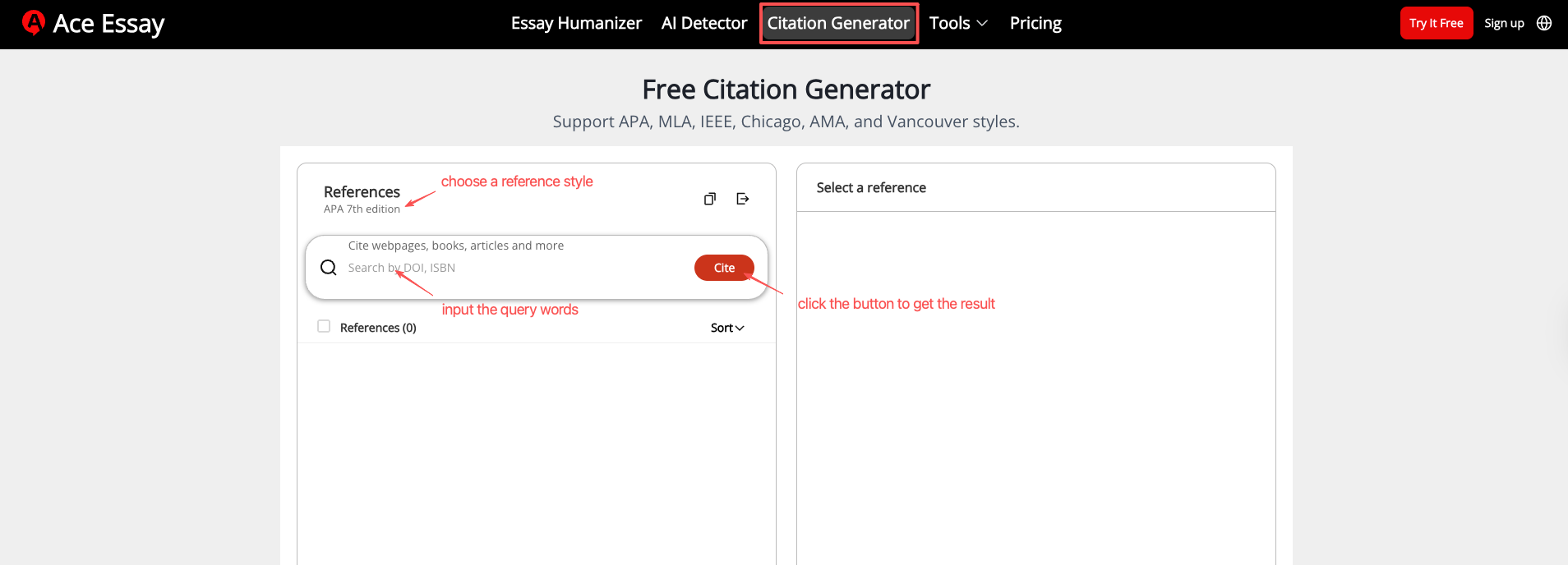
Writing accurate references in line with complex formatting rules is no easy task. Ace Essay has just launched its Citation Generator to help you produce precise, officially-formatted references. Currently, it supports six mainstream citation styles: APA 7th edition, MLA 9th edition, AMA 11th edition, IEEE, Chicago 17th edition, and Vancouver. Choose the style you need, enter your search term, and click the “Cite” button to receive a perfectly formatted reference.

interface of citation generator

The generated reference text can be copied to the clipboard or exported to a Word file.

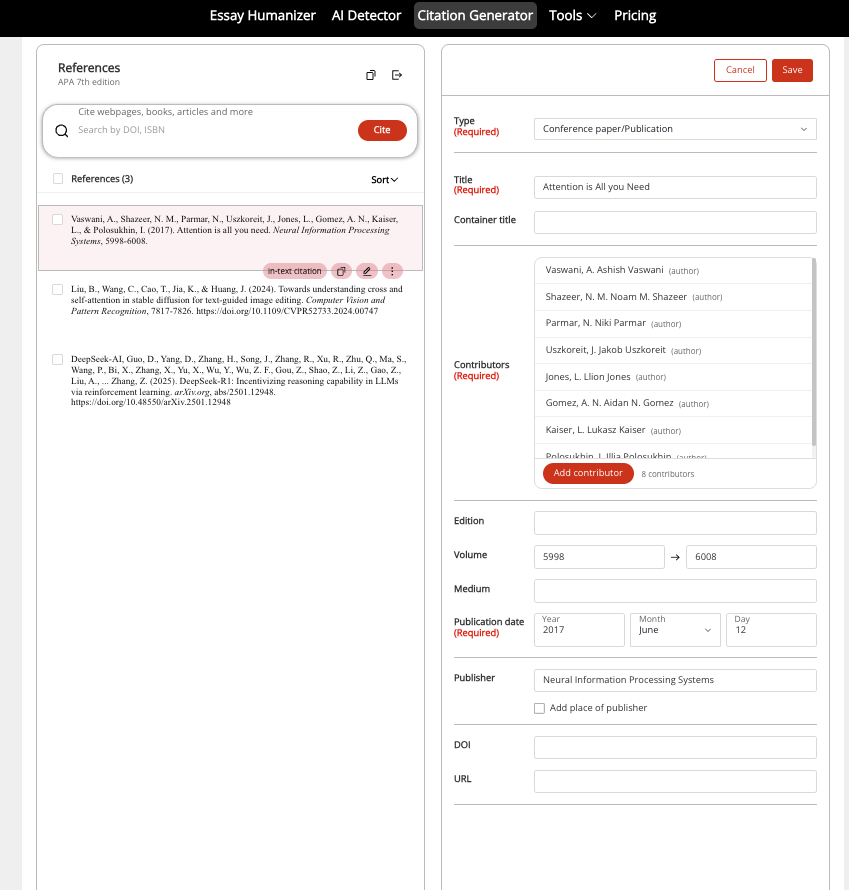
A detailed attribute-editing panel on the right side of the product lets you fine-tune each field to meet publisher requirements.

interface of citation generator

More citation styles will be added in the near future.

Claire Dawson

Personal profile

Claire Dawson is a dynamic content strategist at AceEssay, blending creativity with data-driven insights to craft compelling narratives and optimize SEO strategies. With a solid background in Marketing and Digital Media, Claire thrives on helping brands, especially in the academic space, grow their digital presence.

At AceEssay, she’s the driving force behind the brand’s editorial voice, developing content that speaks directly to users while also optimizing it for search engines. Her unique approach combines her deep understanding of audience psychology with cutting-edge AI tools to elevate the academic writing process.

Outside of her work at AceEssay, Claire is an avid traveler and a hobbyist photographer. At the same time, she loves making friends with people of different backgrounds.

Fiona Zhang

Personal profile

Fiona Zhang is a content strategist and operations lead at AceEssay, where she specializes in brand storytelling, SEO content planning, and user community growth.

With a background in Communication and Digital Media, Fiona has worked across multiple content-driven startups, helping them scale from niche audiences to recognized online brands. At AceEssay, she focuses on building the brand’s editorial voice, managing cross-platform campaigns, and exploring how AI tools can enhance authentic academic writing. Her work blends data insight with creativity, making each piece of content both discoverable and meaningful.

When she’s not crafting strategies, Fiona enjoys photography, reading marketing case studies, and experimenting with coffee recipes.

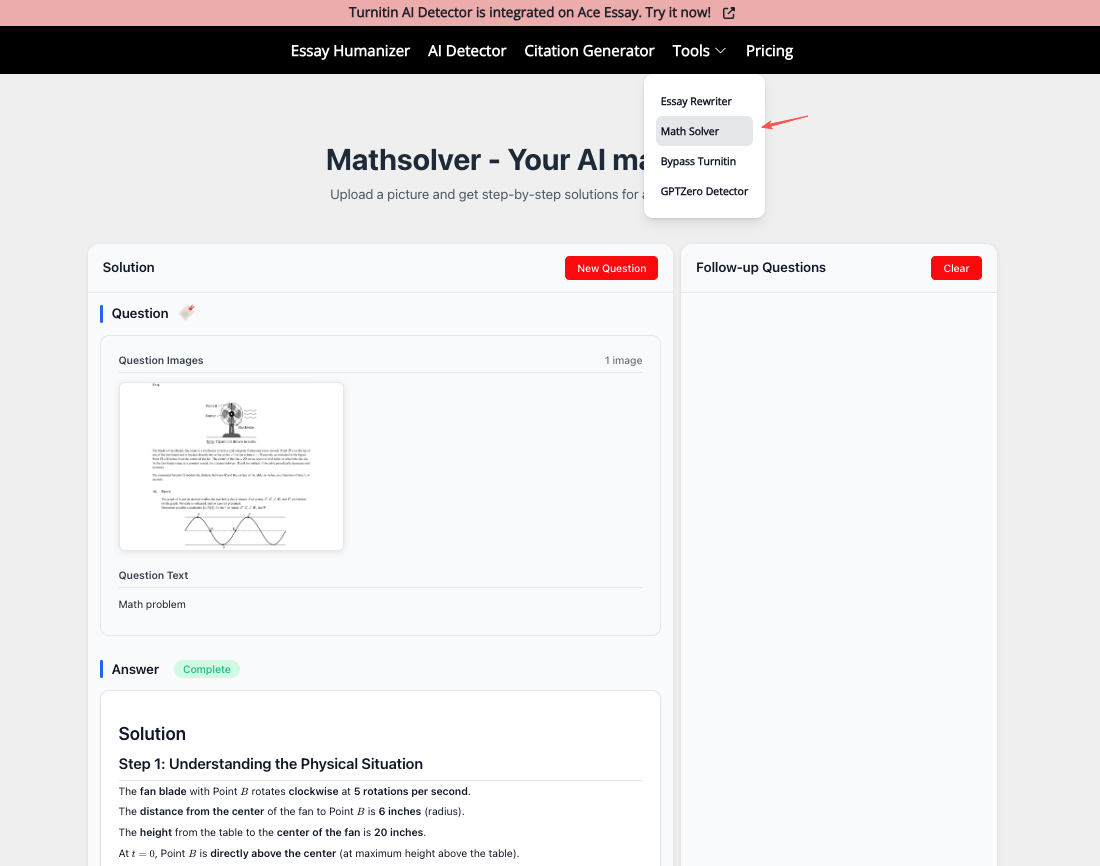
Ace Essay has just launched Math Solver. It achieves over 95 % accuracy on high-school and undergraduate math problems. Simply upload or screenshot an image of the question and you’ll receive a complete, step-by-step solution.

interface for math solver
Now this new feature is free, and you can try it without signing up.

This is a hubmot like free humanizer.

Why Is ChatGPT So Slow? 7 Reasons and How to Fix It

Have you found yourself wondering, “Why is ChatGPT so slow?” or searching Google for phrases like “chatgpt slow” or “why is my ChatGPT so slow?” If so, you’re definitely not alone. ChatGPT has become a widely used AI tool, helping millions with everything from writing assistance to coding help. However, many users have reported delays, laggy outputs, or even times when ChatGPT becomes unresponsive. These slowdowns can be frustrating, especially when you rely on ChatGPT to work quickly and efficiently.

In this article, we will explore seven of the most common reasons behind ChatGPT’s sluggish performance. More importantly, we will provide practical and easy-to-follow solutions that you can use to speed up your ChatGPT experience. Whether you’re a casual user or a professional relying on ChatGPT daily, these tips can help you get back to a faster and smoother AI chat.

Common Reasons Why ChatGPT Is So Slow

  1. Peak-Time Server Overload

One of the main reasons ChatGPT becomes slow is high demand on OpenAI’s servers during peak usage times. When millions of users are simultaneously accessing ChatGPT, especially right after new updates or during major news events, the servers can become overloaded. This causes delays in processing requests and slower responses.

For instance, as mentioned in a LinkedIn article, many users have reported significant lagging during peak hours. It’s similar to how websites slow down when too many visitors access them at the same time. While OpenAI continuously works to improve infrastructure and reduce these issues, high traffic can still cause bottlenecks. You can also check the OpenAI Status Page to see if server issues are ongoing.

  1. Long Conversations Build Up Context

ChatGPT is designed to remember the full conversation history within a single session. This helps it maintain context and provide relevant responses. However, this also means that the longer your conversation, the more data the model has to process and analyze before generating a reply. This increased complexity naturally slows down the response time.

Users on OpenAI’s forums have found that starting a fresh conversation or clearing the chat history can significantly improve speed. So, if you notice ChatGPT lagging, try opening a new session instead of continuing an old one with hundreds of messages. For more tips on managing AI conversation context, check out this helpful guide on AI conversation best practices.

  1. Browser Cache and Extensions

Sometimes, the issue isn’t ChatGPT itself but your web browser. Over time, your browser accumulates cached data and cookies that can slow down its performance. Additionally, some browser extensions, especially those that block scripts or ads, may interfere with ChatGPT’s interface.

A helpful guide from PopAI recommends clearing your browser cache regularly and trying to disable any unnecessary extensions when using ChatGPT. Alternatively, switching to a different browser such as Chrome, Firefox, or Edge may improve speed and compatibility. For step-by-step instructions, see this Mozilla support page on clearing cache.

  1. Network Instability

Your internet connection plays a critical role in how quickly ChatGPT can respond. A slow or unstable Wi-Fi connection can cause delays in sending your requests to OpenAI’s servers and receiving responses. Before blaming ChatGPT, ensure your internet is stable by running a speed test or switching to a different network.

As Android Authority highlights, latency issues can often be resolved by moving closer to your router, restarting your modem, or connecting via Ethernet if possible.

  1. Device Limitations

The device you’re using also impacts ChatGPT’s speed. While most of the processing happens on OpenAI’s servers, your device still needs to render the web interface and handle data smoothly. Older computers or smartphones with limited RAM and slower processors can struggle, especially with complex web pages or multiple tabs open.

The team at Claila points out that upgrading to a more powerful device or closing background applications can help improve your ChatGPT experience, particularly if you use it frequently or for long sessions.

  1. Overly Complex Prompts

The nature of your input prompt can affect response times. Very long, complicated, or poorly structured prompts require ChatGPT to spend more time understanding and generating a coherent answer. Simplifying your questions and breaking down complex tasks into smaller chunks can make responses faster and more accurate.

As HIX.AI recommends, using clear and concise language not only improves speed but also reduces the chances of misinterpretation.

  1. Free vs. Paid Plan Differences

OpenAI provides both free and paid access to ChatGPT. During times of heavy usage, paid subscribers with ChatGPT Plus get priority access to servers, resulting in faster responses and less waiting. If you’re using the free version, you may experience slower speeds or even temporary unavailability during peak demand.

According to Claila’s performance tests, upgrading to ChatGPT Plus can be a worthwhile investment if you depend on quick and consistent AI assistance.

Tips to Improve ChatGPT Speed

Here are some practical steps you can take right now to improve ChatGPT’s speed:

  • Start a new chat if your current conversation feels sluggish.

  • Clear your browser cache and disable unnecessary extensions.

  • Switch to a reliable internet connection and reduce network congestion.

  • Simplify your prompts to avoid overwhelming the AI.

  • Consider upgrading to ChatGPT Plus for priority access.

Additionally, if you’re still experiencing problems, you can check OpenAI’s status page or their official social media channels for updates on outages or maintenance.


With a better understanding of what’s slowing down ChatGPT—and how to fix it—you’ll be well on your way to faster, more productive AI chats. And when GPT stalls while you’re trying to reduce AI detection scores, consider using AceEssay for a smoother, humanized solution.

In today’s rapidly evolving digital landscape, the ability to distinguish between human-generated content and AI-generated text has become crucial. AI detection tools, also known as AI detectors or AI recognizers, are designed to identify artificial intelligence-generated content by analyzing linguistic and statistical patterns. Understanding how AI detection tools work, including how AI recognizers operate and specifically how GPTZero works, is key for educators, content creators, and digital platforms aiming to uphold authenticity and trustworthiness. This article explores the underlying mechanisms of AI detection, their practical applications, and the future of this increasingly important technology.

What Are AI Detectors and AI Recognizers?

To begin with, it’s important to clarify what AI detectors and AI recognizers are. Both terms generally refer to software tools designed to analyze text and identify whether it has been generated by artificial intelligence. While they are often used interchangeably, there can be nuanced differences: an AI detector typically flags content as AI-generated or human-written, whereas an AI recognizer might provide a more granular analysis, identifying specific AI models or techniques used.

AI detection tools are primarily used in education to uphold academic honesty, in journalism to verify sources, and in content moderation to prevent misinformation. Popular examples include GPTZero, a tool developed to detect AI-generated essays with high accuracy, and other commercial or open-source tools like OpenAI’s own detection models or Turnitin’s AI writing detection capabilities.

For an overview of how these tools fit into the broader AI ecosystem, you can visit the OpenAI blog on AI detection.

How Do AI Detectors and Recognizers Work?

The core technology behind AI detection is a blend of machine learning, natural language processing (NLP), and pattern recognition. These tools analyze text input and extract features that are statistically unusual or unlikely in human-generated text.

One primary method involves measuring the “perplexity” or “confusion” of the text. Perplexity evaluates how predictable the text is based on language models: AI-generated text tends to have lower perplexity because it follows patterns learned during training, whereas human writing is more varied and nuanced. Additionally, AI recognizers look for repetitive phrases, unnatural syntax, and statistical anomalies such as the frequency of certain words or sentence structures.

GPTZero, for instance, is designed specifically to analyze these features. It calculates metrics such as perplexity and burstiness (variation in sentence complexity) to estimate the likelihood that a passage was generated by an AI model. Detailed insights into GPTZero’s approach can be found on their official site.

Furthermore, AI detection models often rely on large datasets of both human-written and AI-generated text for training, enabling them to recognize subtle differences that may be imperceptible to the naked eye.

What Do AI Detectors Specifically Look For?

AI detection tools search for a number of telltale signs in text. Key markers include:

  • Perplexity and burstiness: AI text typically has a uniform style and lacks the natural unpredictability of human writing.

  • Repetitive or formulaic phrases: AI may reuse specific patterns learned from training data.

  • Statistical outliers: Unusual word frequency distributions or sentence lengths.

  • Semantic coherence and logic: While AI is improving, it may produce subtle logical inconsistencies.

These detectors rely on complex algorithms trained on vast corpora to weigh these factors and score text on its likelihood of AI authorship. However, the task is inherently challenging. Advanced AI models continuously improve at mimicking human nuances, and adversarially crafted text can evade detection. This arms race between AI generation and detection is an active area of research, as discussed in this paper by the MIT Technology Review.

Practical Applications of AI Detection

One of the most critical uses of AI detection tools is in maintaining academic integrity. Universities and schools employ these tools to prevent plagiarism and ensure students submit original work. Similarly, content platforms use AI detection for content moderation, helping to verify the authenticity of articles, reviews, and social media posts.

Moreover, AI detection is integrated into writing assistant platforms that aim to humanize AI-generated content, blending machine efficiency with human nuance. A notable example is AceEssay, a platform that offers AI-powered writing assistance combined with humanization techniques, incorporating AI detection to help users create authentic and credible text.

As AI-generated content becomes ubiquitous, these tools are indispensable for content creators, educators, and businesses who value trust and transparency.

The Future of AI Detection

Looking ahead, AI detection technology will continue to evolve with advances in machine learning and NLP. Detection tools will become more sophisticated, leveraging multimodal data, such as combining text with metadata or behavioral cues, to improve accuracy.

At the same time, there are significant ethical considerations. Balancing user privacy, avoiding false positives, and ensuring transparency in how detection scores are generated are paramount. The debate on AI detection intersects with larger conversations about data rights, surveillance, and responsible AI use, as discussed by The Brookings Institution.

Ultimately, responsible deployment of AI detection tools will be key to harnessing their benefits while minimizing risks.

Conclusion

In summary, AI detection tools are sophisticated systems designed to identify AI-generated text by analyzing linguistic and statistical features. They operate through machine learning models that measure perplexity, burstiness, and other markers of artificial writing. Tools like GPTZero exemplify how this technology works in practice, contributing significantly to upholding authenticity in education, journalism, and online content.

As AI-generated text becomes more common, understanding how AI detection is done empowers users to leverage these tools responsibly. Platforms like AceEssay illustrate how AI detection can be integrated into human-centric writing tools, striking a balance between automation and genuine human expression.

By continuing to improve AI detection and addressing ethical challenges, we can ensure that the digital ecosystem remains trustworthy and transparent.

###English
Aceessay
Aceessay/essay-humanizer
Aceessay/ai-detector
Aceessay/plagiarism-checker
Aceessay/history
Aceessay/essay-rewriter
Aceessay/try-premium
[Aceessay/bypass-turnitin] (https://aceessay.ai/en/bypass-turnitin)

###中文
Aceessay/
Aceessay/essay-humanizer
Aceessay/ai-detector
Aceessay/plagiarism-checker
Aceessay/history
Aceessay/essay-rewriter
Aceessay/try-premium
[Aceessay/bypass-turnitin] (https://aceessay.ai/zh/bypass-turnitin)

###繁體中文
Aceessay/
Aceessay/essay-humanizer
Aceessay/ai-detector
Aceessay/plagiarism-checker
Aceessay/history
Aceessay/essay-rewriter
Aceessay/try-premium
[Aceessay/bypass-turnitin] (https://aceessay.ai/zh-TW/bypass-turnitin)

###日本語
Aceessay/
Aceessay/essay-humanizer
Aceessay/ai-detector
Aceessay/plagiarism-checker
Aceessay/history
Aceessay/essay-rewriter
Aceessay/try-premium
[Aceessay/bypass-turnitin] (https://aceessay.ai/ja/bypass-turnitin)

###Español
Aceessay/
Aceessay/essay-humanizer
Aceessay/ai-detector
Aceessay/plagiarism-checker
Aceessay/history
Aceessay/essay-rewriter
Aceessay/try-premium
[Aceessay/bypass-turnitin] (https://aceessay.ai/es/bypass-turnitin)

###Português
Aceessay/
Aceessay/essay-humanizer
Aceessay/ai-detector
Aceessay/plagiarism-checker
Aceessay/history
Aceessay/essay-rewriterРусский
Aceessay/try-premium
[Aceessay/bypass-turnitin] (https://aceessay.ai/pt/bypass-turnitin)

###Deutsch
Aceessay/
Aceessay/essay-humanizer
Aceessay/ai-detector
Aceessay/plagiarism-checker
Aceessay/history
Aceessay/essay-rewriter
Aceessay/try-premium
[Aceessay/bypass-turnitin] (https://aceessay.ai/de/bypass-turnitin)

###Français
Aceessay/
Aceessay/essay-humanizer
Aceessay/ai-detector
Aceessay/plagiarism-checker
Aceessay/history
Aceessay/essay-rewriter
Aceessay/try-premium
[Aceessay/bypass-turnitin] (https://aceessay.ai/fr/bypass-turnitin)

###Italiano
Aceessay/
Aceessay/essay-humanizer
Aceessay/ai-detector
Aceessay/plagiarism-checker
Aceessay/history
Aceessay/essay-rewriter
Aceessay/try-premium
[Aceessay/bypass-turnitin] (https://aceessay.ai/it/bypass-turnitin)

###Bahasa Indonesia
Aceessay/
Aceessay/essay-humanizer
Aceessay/ai-detector
Aceessay/plagiarism-checker
Aceessay/history
Aceessay/essay-rewriter
Aceessay/try-premium
[Aceessay/bypass-turnitin] (https://aceessay.ai/in/bypass-turnitin)

###Русский
Aceessay/
Aceessay/essay-humanizer
Aceessay/ai-detector
Aceessay/plagiarism-checker
Aceessay/history
Aceessay/essay-rewriter
Aceessay/try-premium
[Aceessay/bypass-turnitin] (https://aceessay.ai/ru/bypass-turnitin)

###한국어
Aceessay/
Aceessay/essay-humanizer
Aceessay/ai-detector
Aceessay/plagiarism-checker
Aceessay/history
Aceessay/essay-rewriter
Aceessay/try-premium
[Aceessay/bypass-turnitin] (https://aceessay.ai/ko/bypass-turnitin)

###العربية
Aceessay/
Aceessay/essay-humanizer
Aceessay/ai-detector
Aceessay/plagiarism-checker
Aceessay/history
Aceessay/essay-rewriter
Aceessay/try-premium
[Aceessay/bypass-turnitin] (https://aceessay.ai/ar/bypass-turnitin)

###Ελληνικά
Aceessay/
Aceessay/essay-humanizer
Aceessay/ai-detector
Aceessay/plagiarism-checker
Aceessay/history
Aceessay/essay-rewriter
Aceessay/try-premium
[Aceessay/bypass-turnitin] (https://aceessay.ai/el/bypass-turnitin)

###Suomi
Aceessay/
Aceessay/essay-humanizer
Aceessay/ai-detector
Aceessay/plagiarism-checker
Aceessay/history
Aceessay/essay-rewriter
Aceessay/try-premium
[Aceessay/bypass-turnitin] (https://aceessay.ai/fi/bypass-turnitin)

###ไทย
Aceessay/
Aceessay/essay-humanizer
Aceessay/ai-detector
Aceessay/plagiarism-checker
Aceessay/history
Aceessay/essay-rewriter
Aceessay/try-premium

###Polski
Aceessay/
Aceessay/essay-humanizer
Aceessay/ai-detector
Aceessay/plagiarism-checker
Aceessay/history
Aceessay/essay-rewriter
Aceessay/try-premium

###Dansk
Aceessay/
Aceessay/essay-humanizer
Aceessay/ai-detector
Aceessay/plagiarism-checker
Aceessay/history
Aceessay/essay-rewriter
Aceessay/try-premium

###Nederlands
Aceessay/
Aceessay/essay-humanizer
Aceessay/ai-detector
Aceessay/plagiarism-checker
Aceessay/history
Aceessay/essay-rewriter
Aceessay/try-premium

###Türkçe
Aceessay/
Aceessay/essay-humanizer
Aceessay/ai-detector
Aceessay/plagiarism-checker
Aceessay/history
Aceessay/essay-rewriter
Aceessay/try-premium

###Blog
Blog

Why Am I Seeing “ChatGPT Internal Server Error”? Understanding the Issues Behind AI Downtime

If you’ve searched for terms like “chatgpt internal server error,” “chat gpt server error,” or even “internal server error character ai,” you’re not alone. These error messages have become a frustratingly common experience for users relying on large language models like ChatGPT and Character.AI. Today, many users are once again facing the dreaded “chatgpt server is having problems” message — sparking questions about reliability, demand, and how to work around these issues.

In this post, we’ll explore what causes these internal server errors, what you can do when they appear, and how tools like AceEssay — an AI platform that humanizes content — offer a different, more dependable experience. We’ll also look at real-time status tools, alternatives, and expert perspectives on improving AI infrastructure.

What Does “Internal Server Error” Actually Mean?

A “500 Internal Server Error” is one of the most generic error codes in web development. It simply means that something has gone wrong on the server’s side, but the server can’t be more specific about what the problem is. When this happens on AI platforms like ChatGPT, it often results from:

  • Server overload due to high user demand

  • A failed backend process or API call

  • Misconfigurations or code errors

  • Infrastructure updates or unplanned outages

More technical insights on this can be found in Cloudflare’s guide on HTTP errors.

Why AI Services Like ChatGPT and Character.AI Experience Server Errors

The explosive growth of generative AI has pushed the limits of infrastructure. OpenAI’s ChatGPT, for instance, now serves millions of users daily. A small configuration hiccup or sudden spike in usage can cause disruptions.

Likewise, Character.AI is also built on powerful transformer models, requiring immense GPU compute. If either service hits its resource limits or runs updates, users may experience “internal server error character ai” messages.

Ars Technica’s report on ChatGPT outages gives some context on how often this happens and why.

Real-Time Server Monitoring and Outage Reports

To verify if the issue is widespread, use public monitoring tools like:

These platforms aggregate user reports and display real-time graphs, helping you confirm whether the “chatgpt internal servererror today” is isolated or global.

A historical example of such issues is detailed in The Verge’s coverage of OpenAI’s November 2023 outage.

Today’s ChatGPT Internal Server Error: What’s Happening?

On days when users flood forums with complaints like “ChatGPT server is having problems,” it’s usually due to temporary backend failures or unexpected user surges.

Reddit threads such as r/ChatGPT often provide up-to-the-minute updates from users around the world. One user recently noted that switching from Chrome to Firefox fixed the issue temporarily — indicating it could sometimes be browser-related, not just server-side.

What Can You Do When You Encounter These Errors?

When you see an internal server error, here are a few quick fixes:

  1. Refresh the Page: Sometimes a new request can resolve the issue.

  2. Clear Your Browser Cache.

  3. Switch Devices or Networks.

  4. Use Status Pages: As mentioned above, check Downdetector or OpenAI’s official status page.

  5. Try Alternative AI Tools:

    1. Claude AI

    2. Perplexity AI

    3. Bing Chat (Copilot)

Exploring More Reliable Alternatives and Humanization Tools

While generative AI chatbots are powerful, they are not always stable. For users looking to transform AI-generated content into natural-sounding, humanized writing — without worrying about server errors — platforms like AceEssay provide a streamlined and focused experience. Rather than functioning as a live chatbot, AceEssay works behind the scenes to humanize and polish content, reducing dependency on real-time GPU-intensive computations.

This difference in architecture allows for greater uptime and reliability for students, writers, and professionals who need fast, dependable results.

The Importance of AI Infrastructure and Transparency

As AI continues to be embedded into education, coding, customer service, and writing workflows, uptime is no longer optional — it’s critical.

Leading voices in tech infrastructure like TechCrunch emphasize the need for more robust GPU pipelines, diversified data centers, and transparent communication with users.

OpenAI has made strides with status.openai.com, but transparency and advance notice for maintenance windows can still be improved across the industry.

Conclusion

From “chatgpt internal server error” messages to sudden outages at Character.AI, generative AI is going through growing pains. These problems can be frustrating, especially when they disrupt study sessions or creative workflows. Fortunately, with tools like AceEssay offering dependable and focused functionality, and with access to monitoring tools and alternatives, users have a path forward even during downtime.


0%